Quickstart
This walkthrough analyses the example map that ships with Landschaft. It needs
nothing but a working installation. Run the code in a Jupyter notebook, or save it in a .py file
and run it with python.
1. Load a map
import landschaft as ls

forest = ls.load_raster(ls.example_data("input"))
print(forest.shape, forest.dtype)   # (1000, 1000) uint8
print(forest.rio.crs)               # its coordinate reference system
ls.example_data("input") is the path of a GeoTIFF inside the package;
load_raster reads any raster file the same way, e.g.
ls.load_raster("my_forest.tif"). The result is an xarray.DataArray: the
pixel values plus the georeferencing (coordinates, CRS, NoData), which every
Landschaft function keeps.
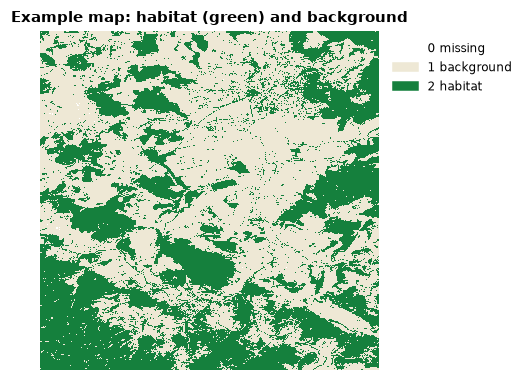
The map is coded the way habitat analyses expect it:
| value | meaning |
|---|---|
| 0 | missing data (outside the study area, clouds...) |
| 1 | background: anything that is not habitat |
| 2 | foreground: the habitat, here forest |
Your own maps rarely come coded this way; core concepts
shows how to build such a map from a land-cover or tree-cover raster with
ls.reclassify.
2. Look at it
ls.plot draws the map on an interactive map over satellite imagery: inline
in a notebook, in a window of its own from a script. The
plotting page shows how it draws every kind of data and how to
choose the colours.
3. Analyse the habitat pattern
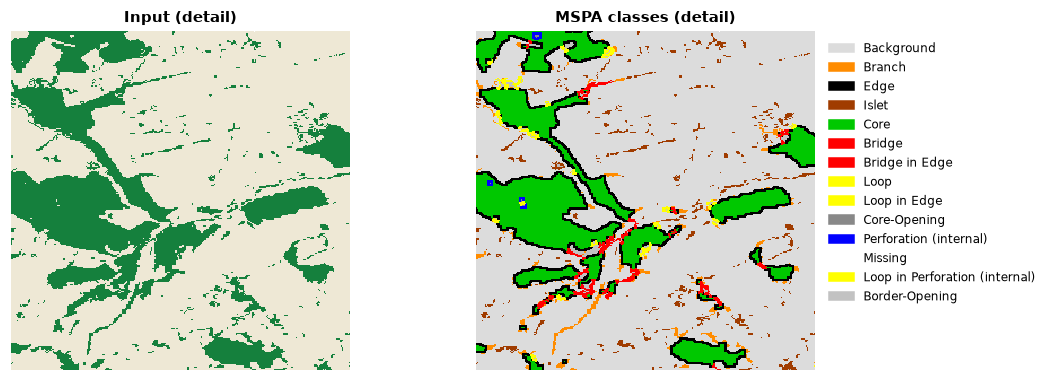
Morphological Spatial Pattern Analysis (MSPA) gives every habitat pixel a role: core (interior habitat), edge (the outer boundary), perforation (the boundary of holes inside the habitat), bridge (connecting two cores), loop (connecting a core to itself), branch (a dead end) and islet (too small to have a core).
edge_width=2 makes edges two pixels wide; everything further inside a patch
is core. On a 1,000 × 1,000 map this takes a fraction of a second.
4. Summarise
Each row is a class, with its number of pixels, its share of the data area
and its share of the habitat. The table is a pandas DataFrame: save it with
ls.save(stats, "mspa_classes.csv") (or .xlsx) or keep working with it in pandas.
5. Save the map
The GeoTIFF keeps the georeferencing and embeds the MSPA colour table, so it opens in QGIS or ArcGIS with the usual colours.
Where next
- Core concepts: how to prepare your own data.
- The tutorial of your topic, from habitat patterns to circuit connectivity.
- Configuration: threads and memory for large maps.