Fragmentation
Fragmentation describes how habitat is broken up: whether an organism at a given spot is surrounded by habitat or by a mix of habitat and other land. The answer depends on how far it looks around, the observation scale: a spot can sit inside a small, intact woodlot and yet in a region where forest is rare. This tutorial measures fragmentation with moving windows, at one or many scales, and describes the mix of land uses around every pixel.
You will learn to:
- map habitat density around every pixel and read its six classes;
- compare observation scales;
- choose between area density, edge density and clustering;
- work with continuous (percent-cover) maps;
- describe the mix of three land-cover types with a landscape mosaic;
- compute contagion, clustering, spatial entropy and other window statistics.
Input: a binary habitat map for most tools; a three-class land-cover map for the landscape mosaic; a percentage map for the grayscale tools.
Habitat density in a moving window
For every habitat pixel, forest area density (FAD) is the percentage of habitat among the valid pixels of a square window centred on it. A window of 27 × 27 pixels over 25 m pixels looks at a 675 m × 675 m neighbourhood (45.6 ha).
result = ls.fad(forest, window_size=27)
ls.plot(result)       # the FAD map in GuidosToolbox's colours, its chart and numbers
result.stats
The densities are grouped in six classes, the standard way to report them:
| Class | Density | Meaning |
|---|---|---|
| Intact | 100% | only habitat in the window |
| Interior | 90 – < 100% | habitat with small gaps |
| Dominant | 60 – 90% | habitat dominates the neighbourhood |
| Transitional | 40 – 60% | habitat and other land in similar amounts |
| Patchy | 10 – 40% | habitat is the minority |
| Rare | < 10% | isolated habitat pixels |
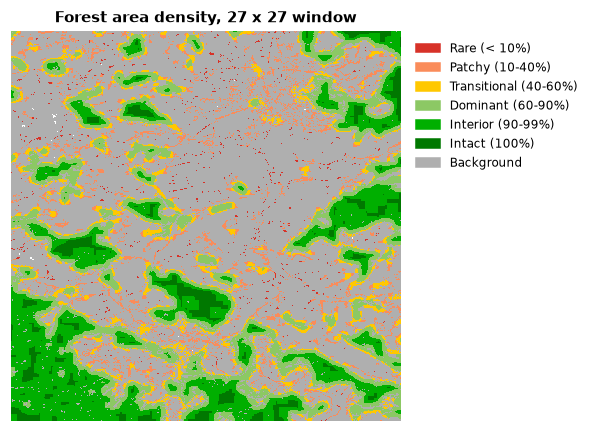
| Attribute | Content |
|---|---|
result.density |
density map, 0–100% on habitat pixels (101 background, 102 missing) |
result.classes |
class map, 1 (rare) to 6 (intact) |
result.stats |
share of the habitat in each class and the average density |
result.summary() |
a printable report |
Save the density map with its standard colours:
ls.write_raster(result.density, "fad27.tif")   # colour table of the six classes
ls.save(result, "fad27")                       # or the whole result: maps, tables and numbers
Several observation scales
The same pixel can be interior at a short distance and patchy at a long one.
fad_multiscale computes the densities at several window sizes at once
(7, 13, 27, 81 and 243 pixels by default) and combines them:
multi = ls.fad_multiscale(forest)
multi.stats[["observation_scale", "intact_%", "interior_%", "rare_%", "average_fad"]]
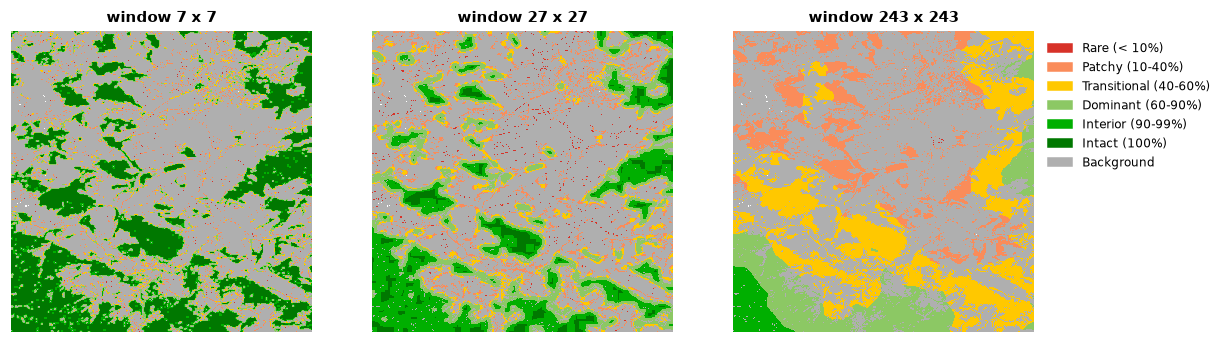
The average density falls as the window grows: this forest is intact at the
scale of a few hundred metres but only transitional over several kilometres.
The last row of stats, MultiScale, averages over all scales; avcon is
the average connectivity. multi.single_scales[27] is the density map of one
scale and multi.multiscale_map the combined map.
Fragmentation at a fixed observation scale
fos reports fragmentation at one scale with three ways of measuring it:
| Method | Measures | Use when |
|---|---|---|
"FAD" |
habitat area density: share of habitat in the window | the amount of habitat matters |
"FED" |
habitat edge density: how alike the neighbouring pixel pairs of the window are (few habitat edges score high) | the amount of edge matters |
"FAC" |
habitat area clustering: share of habitat–habitat pairs among all neighbouring pairs (binary maps only) | the aggregation of habitat matters |
and 6 classes (as above) or 5 (intact merged into interior):
Besides the class map (fos.map) and the class shares, the result reports
patch statistics of the whole map: fos.n_patches, fos.average_patch_size,
fos.eca (equivalent connected area), fos.coherence, fos.average and
fos.avcon. print(fos.summary()) shows everything.
Percent-cover maps
fos also accepts grayscale maps: a percentage of habitat per pixel
(0–100, 255 missing), e.g. tree cover. Pixels of at least gray_threshold
percent count as habitat; the density is the mean percentage in the window:
cover = ls.load_raster(ls.example_data("gscinput"))   # 0-100, 255 missing
gray = ls.fos(cover, window_size=27, gray_threshold=30)
gray.grayscale, gray.stats
Landscape mosaic
When the question is not "how much habitat" but "what mix of land uses", the landscape mosaic describes the composition of every window with three land-cover types, coded 1 agriculture, 2 natural (forest), 3 developed and 0 missing. Each window falls in one of 19 classes, from pure (100% of one type) through dominant (more than 60%) to mixed mosaics.
Build the three-class map from the CORINE example (classes 1–11 are artificial surfaces, 12–22 agriculture, 23–34 forest and semi-natural areas, 35–44 wetlands and water):
landcover = ls.load_raster(ls.example_data("clc"))
three = ls.reclassify(landcover, [(1, 12, 3),     # artificial surfaces: developed
                                  (12, 23, 1),    # agriculture
                                  (23, 35, 2)],   # forest and natural vegetation
                      others=0)                   # wetlands and water: missing

mosaic = ls.landscape_mosaic(three, window_size=27)
ls.plot(mosaic)
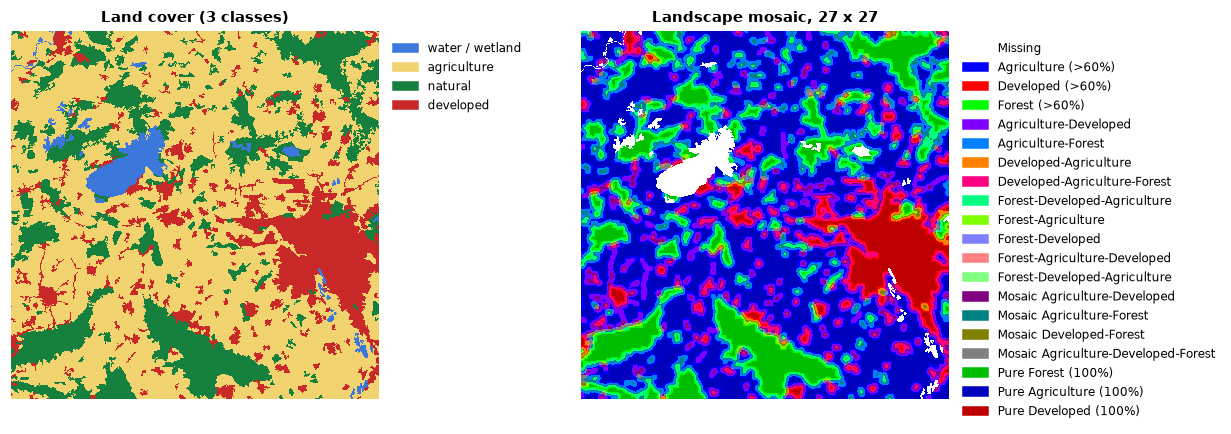
ls.LM19_CLASSES names the 19 classes and ls.lm_colormap() colours them.
With output_classes=103 every window is placed in one of 103 finer cells of
the composition triangle. The share of the map in each of those cells, the
heat map of the landscape, comes from:
and ls.landscape_mosaic_stats(three) returns the same frequencies as a
table.
Other window statistics
| Function | Result |
|---|---|
ls.contagion_pff(forest, window_size=7) |
contagion: probability that a neighbour of a habitat pixel is habitat |
ls.clustering_fac(forest, window_size=7) |
clustering: share of all joins that are habitat–habitat |
ls.spatial_entropy(forest) |
one index (0–100%) of the disorder of the habitat pattern |
ls.spatial_entropy_map(forest, window_size=50) |
the same in a moving window |
ls.gray_spatial_convolution(cover, metric="mean", window_size=7) |
window mean, median, majority, min, max, range, standard deviation, Shannon diversity and evenness, or contagion of a percentage map |
entropy = ls.spatial_entropy(forest)
contagion = ls.contagion_pff(forest, window_size=13, as_byte=False)   # 0-1, NaN off habitat
smooth = ls.gray_spatial_convolution(cover, metric="stddev", window_size=9)
round(entropy.entropy_index, 1)
Choosing a window size
- Match the window to the process: the home range of a species, the distance of seed dispersal, the scale of a management unit.
- Express it in map units: window side × pixel size (27 × 25 m = 675 m).
- Report several scales when the relevant one is unknown, which is what
fad_multiscaleis for. - Windows must be odd (a centre pixel). Near missing data and the map border, only the valid pixels of the window count.
Next steps
- Count and compare patches with landscape metrics.
- Follow fragmentation over time in change detection.