Landscape metrics
Landscape metrics turn a categorical map into numbers: how many patches of each land cover there are, how large and how complex they are, how aggregated each class is, how diverse the landscape is. They are the standard way to compare landscapes, follow them over time and relate their structure to ecological processes.
You will learn to:
- compute metrics at the patch, class and landscape levels;
- find and select metrics among the 130+ available;
- set the options that change how patches and edges are counted;
- map metrics, sample them in plots, moving windows and zones;
- follow landscapes over time and group landscapes by their structure;
- handle rasters larger than memory and very large tables.
Input: any categorical raster (integer classes), such as a land-cover map.
The three levels
A patch is a group of connected cells of the same class. Metrics exist at three levels:
| Level | One value per | Examples |
|---|---|---|
| patch | patch | area, perimeter, shape index, distance to the nearest patch of the same class |
| class | class | total area, number of patches, edge density, aggregation index |
| landscape | map | total edge, Shannon diversity, contagion |
and fall into families: area and edge, shape, core area, aggregation (how clumped or dispersed), diversity (how many classes, how evenly spread) and complexity (information-theory measures).
First metrics
import landschaft as ls

landcover = ls.load_raster(ls.example_data("clc"))   # CORINE, 25 m
lc = ls.Landscape(landcover)
lc
Landscape prepares the map once (it finds all patches of all classes in one
pass) and then answers any number of metric requests quickly.
Areas are in hectares and lengths in map units (metres here). The
class column is the land-cover code and id numbers the patches.
ca is the class area (ha), pland its share of the landscape (%), np the
number of patches, ed the edge density (m/ha) and ai the aggregation index
(%).
Shannon diversity (shdi), contagion (contag, %) and landscape shape index
(lsi) of the whole map.
These wide tables have one column per metric. The long format has one row per value, which is convenient for many metrics and levels at once:
The one-call form, without keeping a Landscape, is
ls.landscape_metrics(landcover, level="landscape").
Finding metrics
list_metrics shows every metric with its name, type and level. The same
filters select metrics everywhere (level, metric, name, type), and a
leading minus excludes:
lc.metrics(level="class", metric=["area", "shape"])   # area_mn, area_sd, shape_mn...
lc.metrics(level="landscape", type="-complexity metric").shape
Metrics are named by their standard abbreviations (ca, shdi,
enn_mn...). Upper-case abbreviations and full names work too in the wide
tables:
The most used metrics:
| Metric | Level | Meaning |
|---|---|---|
area, ca, ta |
patch, class, landscape | area (ha) |
pland |
class | percentage of the landscape |
np, pd |
class, landscape | number of patches, patches per 100 ha |
lpi |
class, landscape | largest patch index: share of the landscape in the largest patch |
te, ed |
class, landscape | total edge (m), edge density (m/ha) |
shape, frac |
patch (+ _mn, _sd, _cv...) |
shape index, fractal dimension |
enn |
patch (+ stats) | distance to the nearest patch of the same class (m) |
core, cai |
patch (+ stats) | core area (ha) and core area index (%) |
ai, cohesion, division, mesh, split |
class, landscape | aggregation, cohesion and subdivision |
contag, iji |
landscape (iji also class) |
contagion, interspersion and juxtaposition |
shdi, shei, sidi, siei, pr |
landscape | diversity, evenness, richness |
Statistics over patches exist for every patch metric: mean _mn, standard
deviation _sd and coefficient of variation _cv, and with extras=True
the area-weighted mean _am, the median _md and the range _ra.
Options
Options are given when creating the Landscape:
| Option | Default | Effect |
|---|---|---|
directions |
8 | 8: cells touching by a corner are the same patch; 4: only by a side |
edge_depth |
1 | how many cells from the patch edge are not core |
consider_boundary |
False | whether the map border counts as an edge for core areas |
count_boundary |
False | whether the map border counts as edge in te and ed |
neighbourhood |
4 | neighbours of the complexity metrics |
classes_max |
None | potential number of classes, for relative richness rpr |
nodata, res |
from the raster | NoData value and cell size (numpy arrays have cells of 1) |
Maps of metrics
With matplotlib, show_* draw the patches and metrics directly:
small = ls.Landscape(landcover[:600, :600])
fig = small.show_lsm("shape")        # shape index of every patch
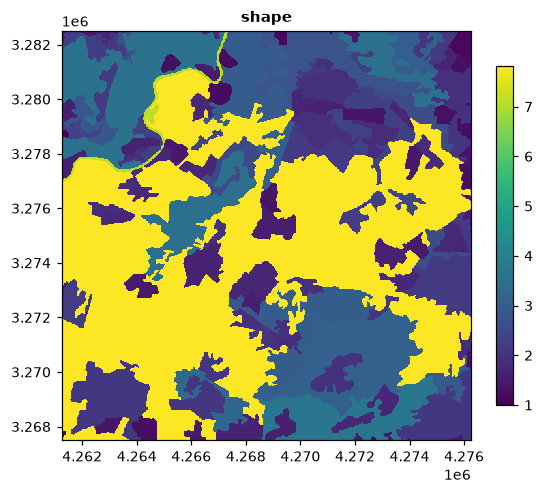
show_patches() draws the patches, show_cores() their core and edge cells,
and ls.show_correlation(table) the correlation matrix of a set of metrics.
Sample plots
Metrics of circles or squares around points, e.g. sampling sites:
import numpy as np

xmin, xmax, ymin, ymax = lc.extent
rng = np.random.default_rng(1)
sites = np.column_stack([rng.uniform(xmin + 2000, xmax - 2000, 10),
                         rng.uniform(ymin + 2000, ymax - 2000, 10)])

plots = ls.sample_metrics(landcover, sites, size=1000, shape="circle",
                          level="landscape", metric=["shdi", "ed"])
plots.head()
size is the radius of a circle or half the side of a square, in map units.
percentage_inside is the area of the cells kept over the area of the plot:
every cell the plot touches is kept, so it can exceed 100%; plots on the map
border fall below. y can also be polygons (shapely geometries or a
GeoDataFrame). ls.scale_sample repeats the sampling for several sizes and
ls.extract_metrics returns the metrics of the patches under the points.
Moving windows
A metric computed in a window around every cell gives a map of how the landscape structure changes across space:
maps = ls.window_metrics(landcover[:800, :800], window=41, what=["lsm_l_shdi"])
diversity = maps["shdi"]
ls.plot(diversity)
ls.write_raster(diversity, "shdi_window41.tif")
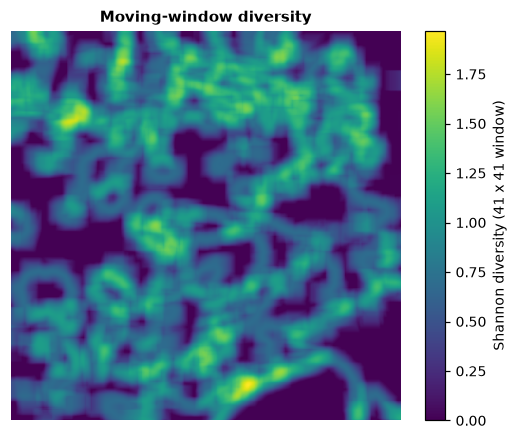
window is an odd side in cells, or an array of zeros and ones for other
shapes (a disc, for example). Only landscape-level metrics are available.
Zones
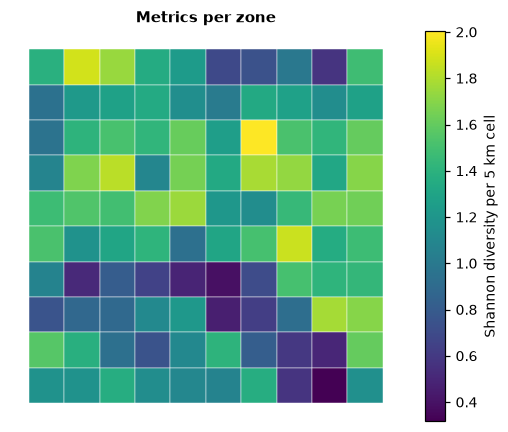
Metrics for each polygon of a vector layer, or for each cell of a regular grid (needs geopandas):
zones = ls.grid_zones(landcover, 5000)          # 5 km squares over the map
per_zone = ls.zonal_metrics(landcover, zones, level="landscape", metric=["shdi", "np"])
per_zone.head()
The result is a GeoDataFrame, ready to map or save
(ls.write_table(per_zone, "zones.gpkg")).
Several maps and time series
A list of rasters gives a layer column:
later = landcover.copy()
block = later.values[1200:1500, 1300:1700]
later.values[1200:1500, 1300:1700] = np.where(block == 12, 1, block)   # arable land built up

ls.landscape_metrics([landcover, later], level="landscape", metric=["np", "shdi"])
SpatioTemporalAnalysis organises such series by date and plots them:
series = ls.SpatioTemporalAnalysis([landcover, later], dates=[2018, 2030])
series.class_metrics(["pland", "np"]).head()
It works on whole maps, on zones (zones=), around points (points=,
size=) or on a grid (grid=); series.plot_metric("pland", classes="all")
draws the trends.
Spatial signatures
Describe many landscapes (or zones of one map) by a set of metrics, then find the main gradients and groups among them:
signatures = ls.SpatialSignatureAnalysis(
    landcover, grid=5000,
    landscape_metrics=["shdi", "ed", "np"], class_metrics=["pland"],
)
pca = signatures.pca()           # principal components of the metrics
groups = signatures.cluster(4)   # k-means groups of zones
np.bincount(groups)
nmf, hierarchical clustering (cluster(k, method="ward")) and the
clustergram (clustergram, plot_clustergram) are also available.
Extra FRAGSTATS metrics
Some FRAGSTATS metrics need more information:
contrast = {(12, 23): 0.8, (12, 2): 0.3, (2, 23): 0.9}   # edge contrast between classes
lcx = ls.Landscape(landcover, search_radius=500, connect_threshold=200, contrast=contrast)
lcx.class_metrics(["prox_mn", "connect", "cwed"], extras=True).head()
prox (proximity) and simi (similarity) use the patches within
search_radius; connect counts pairs of patches within
connect_threshold; econ, cwed and teci weigh edges by the contrast
between their classes (pairs not in the table give NaN).
Very large rasters and tables
For rasters larger than memory, give a file and block_rows: the file is
read in blocks and only the patch tables stay in memory, with the same
results:
big = ls.Landscape("continent_landcover.tif", block_rows="auto")
big.class_metrics(["ca", "np", "ed"])
Tables with millions of patches can be streamed to disk:
Next steps
- Connectivity between the patches: habitat networks.
- Patterns of a single habitat: habitat patterns.