

Plugins in WebAssembly
Write your own cell-by-cell operator in any language that compiles to WebAssembly, run it with plugin.wasm in a sandbox, and grow a forest stand year by year with fellings, something map algebra cannot do.
- Level
- Advanced
- Time
- 45 min
Map algebra computes a new map from an expression, cell by cell, and covers most needs. But an
expression has no loops and no variables: it cannot simulate thirty years of growth in each cell, apply a rule that
takes forty lines of code, or reuse a function you already wrote in C or Rust. For that, Terraflux runs
plugins: small functions compiled to WebAssembly, called once for every cell by the operator
plugin.wasm. In this tutorial you will write a plugin that grows a forest stand year after year, with a
felling every twenty years, run it over a map of site productivity, check it against an independent calculation,
and see how the sandbox protects you from a plugin that never ends.
The idea#
WebAssembly (Wasm) is a small, portable instruction format, made to run code from the web safely in a
browser at nearly native speed (Haas et al., 2017). Many languages compile to it: Rust, C, C++, Zig,
AssemblyScript, Go... A WebAssembly module is a file (.wasm, or .wat in its text form) that exports
functions. It can do arithmetic, loops and branches, but it can do nothing outside itself unless the program that
runs it gives it the means: no files, no network, no clock.
Terraflux uses exactly that. plugin.wasm loads a module and calls one of its functions for every cell of
the maps connected to it:
- the function's arguments are the node's inputs, in the order given by the setting
args: a map gives each cell's value, a number the same value for every cell; - every argument and the result are 64-bit floating-point numbers (
f64); - a cell with no value arrives as NaN ("not a number"), and the function decides what to do with it;
- the function's result is the cell's value in the output map.
Key idea
A plugin is a function \( y_i = g(x_{1,i}, x_{2,i}, \dots) \) applied to every cell \(i\), like map algebra, but \(g\) can be any program: loops over time, many variables, branches, iterations to convergence. Because it runs in a sandbox (it imports nothing, and every call has a budget of instructions), a plugin cannot read or damage your files, and one that never ends is stopped with an error. That makes plugins safe to send to other computers in a batch: the module travels to the workers like the model's maps.
When to use it#
- A process in time within each cell: growth, decay, succession, a water balance, degree-days. A loop over years is easy in a plugin and impossible in an expression.
- Code you already have: a function of an allometry library, a published model's equations written in C. Compile it to WebAssembly and use it as a node.
- Long rules: forty lines of
ifare unreadable in one expression and ordinary in a function. - Speed: a compiled function is fast.
raster.calcis fast too; use a plugin for what an expression cannot say, not for what it says well.
What a plugin is not for: anything that needs the neighbours of a cell (a plugin sees one cell at a time; use
the nb* functions of raster.calc or the operators of the library), anything that reads or writes files, and
whole-map statistics. For those, chain a plugin with other nodes.
What you need#
- Terraflux.
- The module. WebAssembly has a text format,
.wat, that Terraflux reads directly: you can write a plugin in any text editor, with no compiler. That is what this tutorial does. For larger functions, write them in a language you know and compile them (see Plugins in other languages). - A map to apply it to: here a site productivity drawn by
nlm.gaussian_field, so the model runs as it is.
Build the plugin#
The model it answers#
A forest stand's biomass \(B\) (tonnes per hectare) grows each year by the logistic model (Verhulst, 1838), fast when the stand is young and slower as it approaches the site's carrying capacity \(K\):
where \(r\) is the growth rate per year (which depends on the site: soil, water, climate) and \(K = 300\) t/ha. A felling every 20 years removes 60% of the biomass of stands above 150 t/ha. With \(r\) varying from cell to cell, the biomass after 60 years depends on the site and on the history of fellings, year by year. There is no expression for it; there is a loop.
The function, in WebAssembly's text format#
stand.wat holds three functions. The first, grow:
(module
  ;; grow(r, b, years): the biomass after `years` years of logistic growth from `b`
  (func $grow (export "grow") (param $r f64) (param $b f64) (param $years f64) (result f64)
    (local $t f64)
    ;; a missing cell (NaN, which is not equal to itself) stays missing
    (if (f64.ne (local.get $r) (local.get $r)) (then (return (local.get $r))))
    (if (f64.ne (local.get $b) (local.get $b)) (then (return (local.get $b))))
    (block $done
      (loop $year
        (br_if $done (f64.ge (local.get $t) (local.get $years)))
        (local.set $b
          (f64.add (local.get $b)
            (f64.mul (f64.mul (local.get $r) (local.get $b))
              (f64.sub (f64.const 1) (f64.div (local.get $b) (f64.const 300))))))
        (local.set $t (f64.add (local.get $t) (f64.const 1)))
        (br $year)))
    (local.get $b))
  ...
)
The text format is low-level but regular. Read it from the inside out:
(func $grow (export "grow") (param $r f64) ... (result f64)declares a function, exported under the namegrow, with threef64parameters and anf64result. The names$r,$b,$yearsare for the reader.(local $t f64)is a variable, the year, starting at 0.(f64.ne (local.get $r) (local.get $r))is true only for NaN, the one value not equal to itself: a missing cell returns NaN at once, so the output has no value there either.(loop $year ...)with(br $year)at its end repeats;(br_if $done ...)leaves it when \(t \ge\) years.- Inside,
local.set $bis the logistic formula above, written as nested operations:f64.add,f64.mul,f64.sub,f64.div.
The second function, harvested(r, b, years, cycle), calls grow for one year at a time and, every cycle
years, multiplies the biomass by 0.4 when it is above 150 t/ha. The third, forever, loops forever, to show the
sandbox. The whole file is in the website's repository, in website/figures/building-models/plugins/stand.wat.
Build the model#
Model file (TOML)
format = "terraflux/1"
name = "Stand growth"

[[nodes]]
id = "site"
op = "nlm.gaussian_field"
params = { rows = 200, columns = 200, range = 30, seed = 21 }
note = "Site productivity, 0 to 1 (in its place, a map of site index or of soils)."

[[nodes]]
id = "rate"
op = "raster.calc"
inputs = { s = "site.map" }
params = { expression = "None if s < 0.15 else 0.03 + 0.12 * s" }
note = "The growth rate per year, 0.03 to 0.15; no forest (no value) on the poorest sites."

[[nodes]]
id = "growth"
op = "plugin.wasm"
inputs = { r = "rate.map", b = 20, years = 30 }
params = { path = "stand.wat", function = "grow", args = ["r", "b", "years"] }
note = "The biomass after the years, from 20 t/ha, by the plugin's loop."
Node 3 is plugin.wasm:
- inputs of any names:
ris connected to the maprate.map;bandyearsare numbers typed in the node. In the application, Add input in the Node pane adds an input: a name, and a reference (rate.map) or a value (20); path: the module,.wasmor.wat, relative to the model's folder (Choose... opens a dialog);function: the exported function to call,cellby default;args: the inputs in the order of the function's parameters. Without it, the inputs are passed in the order of their names (alphabetical), which is rarely what you want: always giveargs.
At least one input must be a map (it gives the grid of the output), and all the maps must be on the same grid.

Read the results#
Change years in the Node pane and run: the stand grows. From the same start, 20 t/ha everywhere, the map of
biomass after 0 to 60 years:


Now call the second function: function = "harvested", an input cycle = 20, and
args = ["r", "b", "years", "cycle"]. Stands that pass 150 t/ha at year 20, 40 or 60 are felled:

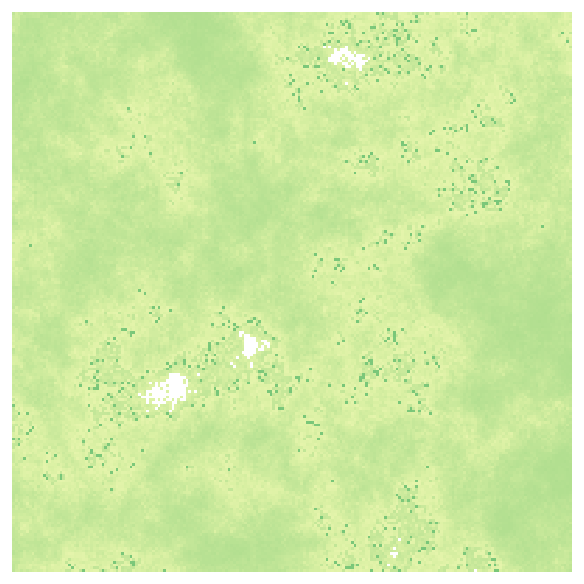 A felling every 20 years
Check your plugin#
A plugin is code, and code has bugs. Before you trust it, compare it with an independent calculation on a few cases. Here the figure script of this page computes the same 30 years of logistic growth with numpy on the rate map that Terraflux wrote, and compares the two: the largest difference over the 39,769 cells with a value is 0.00002 t/ha, the rounding of the 32-bit file the result was written to. The 231 cells without a value are without one in both. When there is a published solution, a test case or the original program, compare with it the same way, and keep the comparison with the model.
Settings that change the answer#
The plugin's own numbers (here \(K = 300\), the felling threshold of 150 t/ha and the 60% removed) are written in
the module. To vary them without editing the module, make them parameters of the function and inputs of the node,
as years and cycle are: then they appear in the Node pane, can be connected to other nodes, and can be changed
for a batch of scenarios ("growth.cycle" = 30, see Randomness and reproducibility).
Errors and the sandbox#
What Terraflux says when something is wrong, from real runs of this model:
Error: growth: node "growth": the plugin exports no function "grows"

Error: growth: node "growth": the plugin's "grow" must take 2 f64 and give one f64
  (it takes [F64, F64, F64], gives [F64])

Error: growth: node "growth": the plugin's "forever" at cell 32768: all fuel consumed by WebAssembly
The first is a misspelt function. The second is an args list of two inputs for a function of three
parameters. The third is the sandbox at work: every call may run at most a million instructions; the function
forever never ends, so its fuel runs out and the run stops with an error, instead of hanging your computer.
A million instructions is a lot (the 60-year loop of harvested uses a few thousand): only a plugin that loops
without end, or a very long computation per cell, meets the limit.
A plugin imports nothing: a module that asks for a function from outside (to print, read a file or get the time) is refused when it is loaded. This is why your compiled code must not use a language's standard library for input and output.
Plugins in other languages#
Any language that compiles to a WebAssembly module with exported f64 functions and no imports works. In Rust (a
library crate with crate-type = ["cdylib"], built with cargo build --release --target wasm32-unknown-unknown;
the module is in target/wasm32-unknown-unknown/release/):
#[unsafe(no_mangle)]
pub extern "C" fn grow(r: f64, mut b: f64, years: f64) -> f64 {
    if r.is_nan() || b.is_nan() {
        return f64::NAN;
    }
    let mut t = 0.0;
    while t < years {
        b += r * b * (1.0 - b / 300.0);
        t += 1.0;
    }
    b
}
In C, without the standard library, for example with clang:
clang --target=wasm32 -O2 -nostdlib -Wl,--no-entry -Wl,--export=grow -o stand.wasm stand.c
Whatever the language, test the function on a few values outside Terraflux first, then on a small map against an independent calculation, as above.
Common pitfalls#
- The order of the arguments. Without
args, inputs are passed in alphabetical order of their names.argsis the only safe way. - Missing cells. NaN goes through arithmetic as NaN, but comparisons with NaN are false: a function that
tests
if b > 150treats a missing cell as "not above 150" and may give it a value. Test for NaN first, asgrowdoes. - Whole numbers. Every argument is a floating-point number, also class codes and years. Compare classes with
f64.eq(or==onf64), and convert to an integer inside the function if you need one. - Units. The plugin knows nothing of the map's cell size or units: give it what it needs as inputs (a rate per year, a cell area in hectares).
- A plugin that should have been an expression. If the rule fits in one line of map algebra,
raster.calcis easier to read for everyone who opens the model.
Going further#
- Map algebra: expressions cell by cell, with neighbourhoods.
- Loops: a whole map evolving step by step, with neighbours; a plugin can be a node of the loop's body.
- Groups and submodels: package a plugin and the nodes around it as one reusable node.
- The parallel computing guide: plugins travel with the model to other computers.
- The operator
plugin.wasm.
References#
- Haas, A., Rossberg, A., Schuff, D. L., Titzer, B. L., Holman, M., Gohman, D., Wagner, L., Zakai, A., & Bastien, J. F. (2017). Bringing the web up to speed with WebAssembly. In Proceedings of the 38th ACM SIGPLAN Conference on Programming Language Design and Implementation (pp. 185–200). ACM. https://doi.org/10.1145/3062341.3062363
- Verhulst, P.-F. (1838). Notice sur la loi que la population suit dans son accroissement. Correspondance Mathématique et Physique, 10, 113–121.